 WilmAI
Free, and set up in a few minutes.
Wilma access for your AI assistant.
Independent project, not affiliated with Visma
This is an independent open-source project by a parent, not affiliated with, endorsed by, or connected to Visma or the official Wilma service.
downloadsby parents across Finland
Keeping up with school is work, especially with more than one kid. WilmAI lets Claude, ChatGPT and other assistants read Wilma, so you can ask in plain words and get one briefing for the whole family.
Works with Claude
 ChatGPT
 Grok
 Meta Muse
 OpenClaw
you ask, your assistant answers
What can you ask?
Ask in your own words. Every question works across all your children.
The week ahead
“What do my kids have going on at school this week?”
Homework
“Is there any homework for tomorrow?”
Upcoming exams
“Are there any exams coming up? What should she study?”
Lesson notes
“Has any teacher left a note about Eino this month?”
Messages and news
“Any new messages from school? Read the attached letter too.”
Grades
“How did the last exams go? What was on the spring report card?”
pick the one you use
Choose your assistant
Use the assistant you already have. Your Wilma login stays on your computer.
Setup happens on your computer. Send yourself this link and open it there.
Claude Desktop
Download one file and open it. Then ask Claude about school.
- Download WilmAI for ClaudeDownload for Claude Desktop
Open this page on your computer to download it.
- Open the file
Claude asks whether to install WilmAI. Click Install.
- Ask Claude about school
For example: “What do the kids have at school tomorrow?” The first time, you log in to Wilma in your browser.
- Works in the Claude app on your computer, not on the web or in the phone app.
- Your Wilma login stays on this computer, in a file only your account can read. To keep the password in your computer's keychain instead, see “Where does my Wilma login live?” in the FAQ below.
Stuck? Tell me what happened: open an issue on GitHub
Coming later: Instinct (not in Finland yet), and OpenAI dots (only on business plans in Finland so far). I'll add setup steps when they work here.
a recipe
Pairs well with OpenClaw
Install the skill, then tell your agent what mornings should look like. Parents run things like:
“Every weekday at 7, post a school briefing for both kids to the family channel, and put new exams in the family calendar.”
One instruction — your agent handles the rest. The ready-made wilma-triage skill does exactly this, exams in the calendar included. Set it up →
or an app of your own
WilmAI Home 0.4.0 Beta
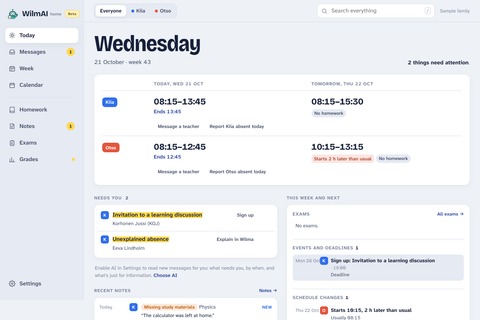
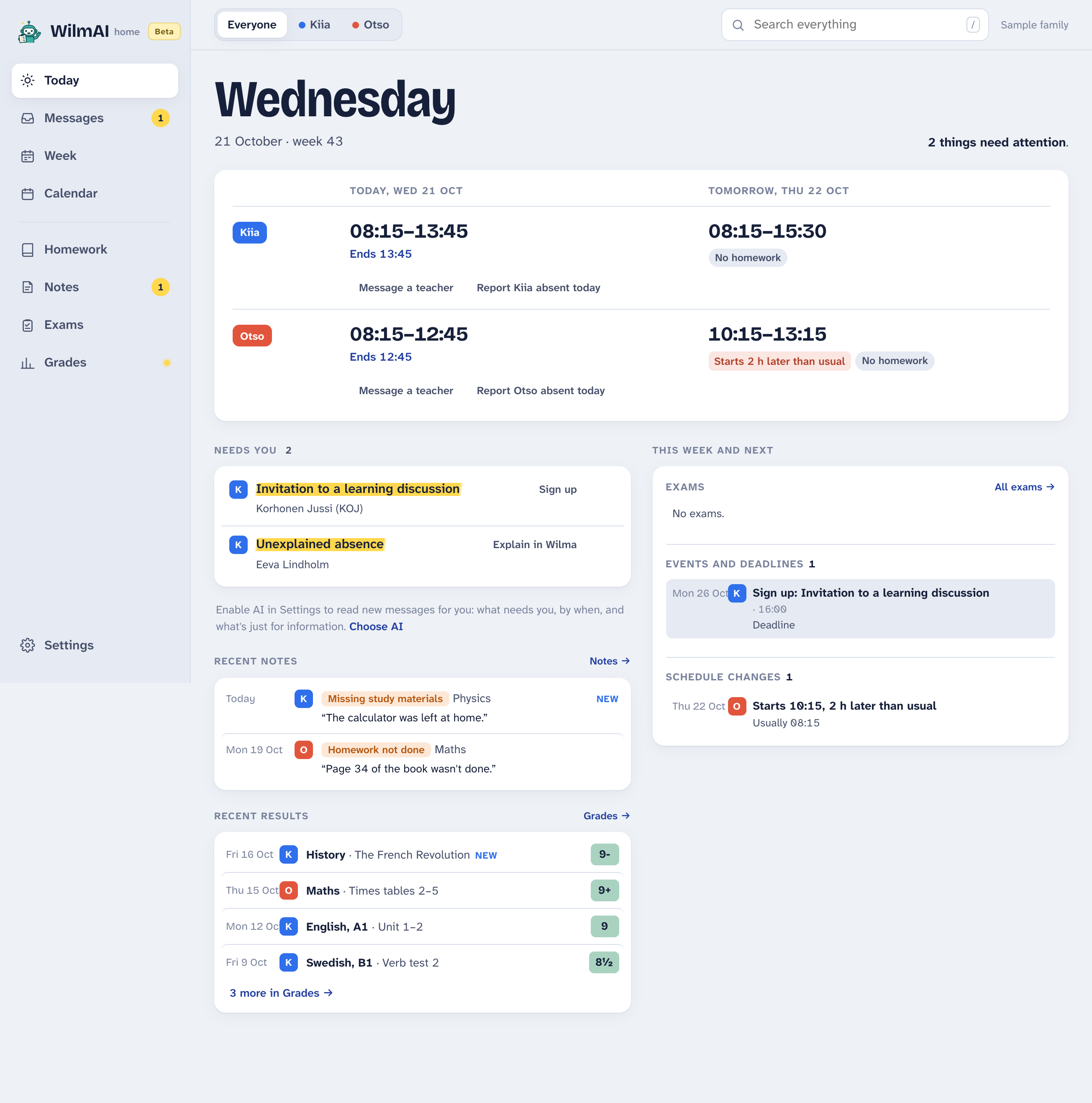
Don't use an AI assistant? WilmAI Home is a fast Wilma app for students and parents, on your own computer. It works without AI.
- Every child's day, messages, exams and grades in one view.
- Messages translated into your language, the original a click away.
- AI that puts what needs you first, if you want it.
- Children at different schools, together.
good questions
FAQ
Which assistant should I use?
The one you already use. Claude Desktop has the simplest setup: download one file and open it. ChatGPT works through its desktop app, in Work mode. Agents with their own computer, like Grok Bot, Meta Muse and OpenClaw, can install WilmAI themselves.
Is there an app of its own, without an assistant?
Yes: WilmAI Home, a fast desktop Wilma app for students and parents, for Mac and Windows, free and open, now in beta. You use it yourself, with AI if you want it. It notifies you when something needs you, and it can also reply to teachers and sign you up for things.
What does it cost?
Nothing. WilmAI is free and open source. Your assistant costs what it already does.
Does it work with my school?
If your child's school uses Wilma, yes. When you log in, type your city or school name and pick your Wilma from the list. You don't need to know its address.
Where does my Wilma login live?
In one folder on your computer, ~/.config/wilmai: the login, and the current Wilma session so your assistant doesn't have to log in again every time. Only your user account can read them. If you'd rather keep the password in your computer's keychain (the macOS Keychain, Windows Credential Manager or a Linux desktop's keyring), run wilma config secrets auto once in a terminal; the login moves there without logging in again. To remove it all, run wilma config clear, which also removes WilmAI's keychain entries. If your assistant runs on its own cloud computer, the login lives in that assistant's secret settings instead.
Do I need an account or a server?
No. WilmAI runs on your computer, or on your agent's computer. There is no WilmAI server, no account, and nothing to sign up for.
Does it work on my phone?
Partly. Agents that run on their own computer, like Grok Bot, Meta Muse and OpenClaw, can be used from your phone once they are set up, and they can send you the daily updates in chat. The Claude and ChatGPT phone apps can't reach WilmAI: your login stays on your own devices, and WilmAI has no server in between.
Is this secure?
WilmAI logs in only to your school's own Wilma, with your own login. There is no middleman, no analytics, and no telemetry. Besides Wilma, it opens links in school bulletins when you ask for an attachment, and checks once a day whether a newer version is out. It is also read-only — it can't send messages or change anything in Wilma.
Does school data end up with an AI company?
What your assistant reads from Wilma goes to that assistant's provider, the same as if you pasted it into a chat. Your Wilma password does not — you type it into the login page, never into the chat. Pick a provider you trust, or use the terminal on its own.
What data can it see?
Exactly what you already see as a parent in the Wilma app, fetched with your own login. Nothing extra, nothing scraped.
Can students use it too?
Yes. A student can log in with their own Wilma account, and the assistant then sees what the student sees: their own lessons, homework, exams, grades and messages.
What if my school changes?
Log in again and pick the new school's Wilma — you can keep several logins side by side.
Is this officially endorsed by Wilma or Visma?
No. This is a hobby project made by a parent who wanted a better way to keep up. It is not officially supported or endorsed by Visma or the Wilma service.
why does this exist?
Parents keep telling me the same thing: they've never been this up to date with what's happening at school. It brings more joy than you'd expect. I hope it does the same for your family.
— Antti
Choose your assistant